Pages API
Reference documentation for application page modules.
Table of Contents
Page Architecture
All pages inherit from BasePage and follow a consistent structure.
BasePage Class
from PyQt6.QtWidgets import QWidget

class BasePage(QWidget):
    """
    Base class for all application pages.

    Provides common functionality and interface.
    """

    def __init__(self, parent=None):
        super().__init__(parent)
        self.setup_ui()
        self.connect_signals()

    def setup_ui(self):
        """Initialize UI components - Override in subclasses"""
        raise NotImplementedError

    def connect_signals(self):
        """Connect signals and slots - Override in subclasses"""
        pass

    def load_data(self, data: dict):
        """Load data into page - Override if needed"""
        pass

    def reset(self):
        """Reset page to initial state - Override if needed"""
        pass
Subclass Template:
from pages.base_page import BasePage

class MyCustomPage(BasePage):
    def __init__(self, parent=None):
        super().__init__(parent)

    def setup_ui(self):
        layout = QVBoxLayout(self)
        # Add widgets
        self.setLayout(layout)

    def connect_signals(self):
        # Connect button clicks, etc.
        self.my_button.clicked.connect(self.on_button_clicked)

    def on_button_clicked(self):
        # Handle event
        pass
Home Page
pages/home_page.py
Welcome page with quick start guide and recent projects.
HomePage Class
from pages.home_page import HomePage

home = HomePage()
home.show()
Features:
Quick start wizard
Recent projects list
Sample data links
Tutorial access
System status
UI Components:
home.welcome_label         # QLabel: Welcome message
home.quick_start_widget    # QWidget: Quick start guide
home.recent_projects_list  # QListWidget: Recent projects
home.sample_data_buttons   # List[QPushButton]: Sample data
home.tutorial_links        # QListWidget: Tutorial links
Methods:
load_recent_projects()
Load and display recent projects.
home.load_recent_projects()
Returns: None
Updates: recent_projects_list widget
open_recent_project(index: int)
Open project from recent list.
home.recent_projects_list.itemClicked.connect(
    lambda item: home.open_recent_project(
        home.recent_projects_list.row(item)
    )
)
Parameters:
index(int): Project index in recent list
Side Effects: Opens project, switches to workspace page
load_sample_data(sample_name: str)
Load built-in sample dataset.
# Load tissue sample data
home.load_sample_data('tissue_samples')

# Load cell culture data
home.load_sample_data('cell_cultures')
Parameters:
sample_name(str): Sample dataset name
Available Samples:
'tissue_samples': Tissue Raman spectra'cell_cultures': Cell culture spectra'pharmaceuticals': Drug analysis spectra
show_tutorial(topic: str)
Open tutorial dialog for specific topic.
home.show_tutorial('preprocessing')
home.show_tutorial('machine_learning')
Parameters:
topic(str): Tutorial topic
Topics:
'getting_started''preprocessing''analysis''machine_learning'
Data Package Page
pages/data_package_page.py
Data import, organization, and group management.
DataPackagePage Class
from pages.data_package_page import DataPackagePage

data_page = DataPackagePage()
Features:
Import CSV/TXT files
Create and manage groups
Data validation
Metadata editing
Batch operations
UI Structure:
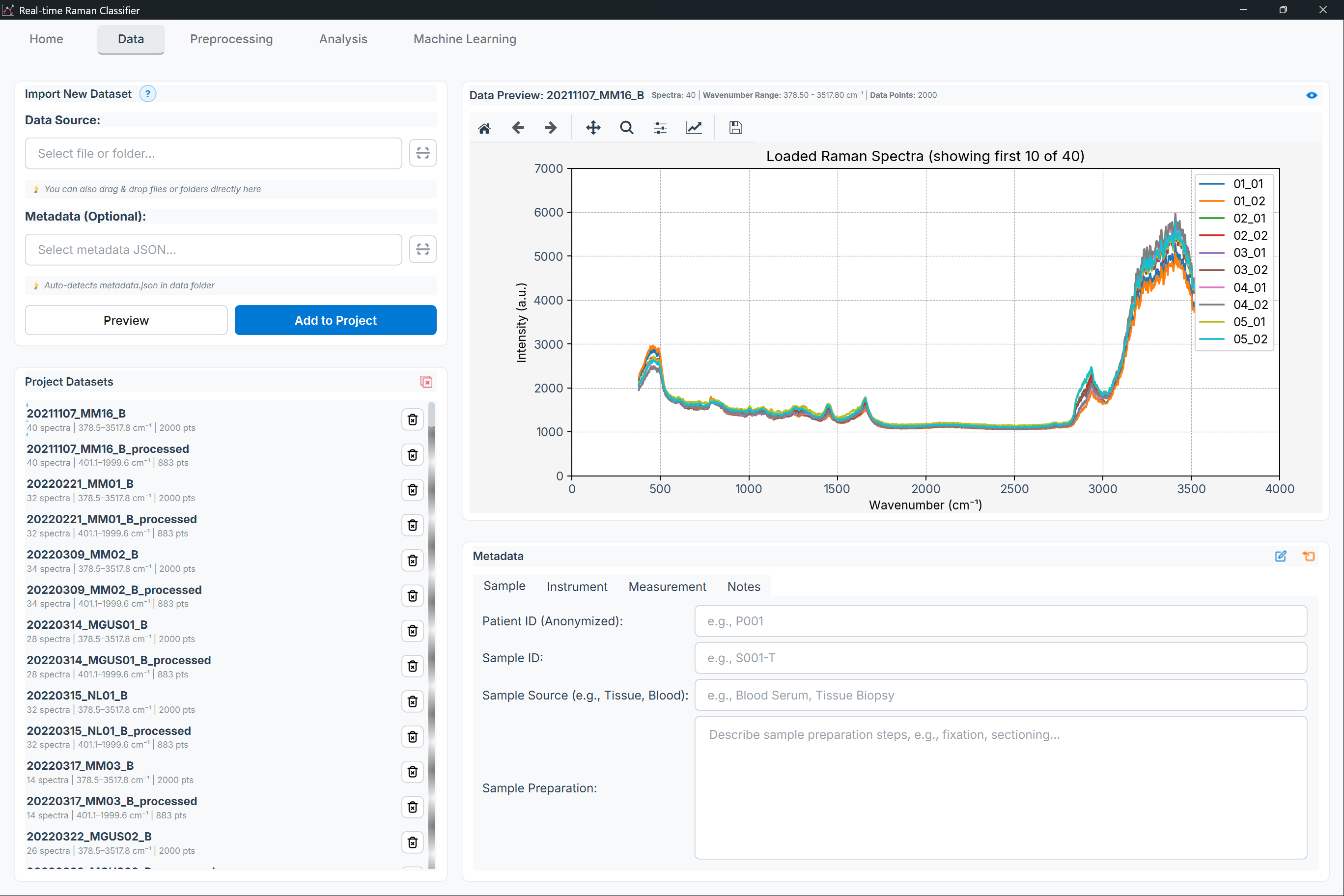
Figure: Data Package page showing the file list (left) and preview/properties (right)
High-level layout:
Import toolbar
File list (left)
Preview plot + properties/metadata (right)
Key Methods:
import_files(filepaths: List[str])
Import spectral data files.
# Single file
data_page.import_files(['data/sample1.csv'])

# Multiple files
data_page.import_files([
    'data/sample1.csv',
    'data/sample2.csv',
    'data/sample3.csv'
])
Parameters:
filepaths(List[str]): List of file paths
Returns: dict - Import summary
Side Effects:
Validates data format
Adds to file list
Updates preview
Supported Formats:
CSV (comma-separated)
TXT (tab-separated)
ASCII with various delimiters
create_group(group_name: str)
Create new sample group.
data_page.create_group('Control')
data_page.create_group('Treatment_A')
data_page.create_group('Treatment_B')
Parameters:
group_name(str): Group identifier
Returns: None
Validation:
No duplicate names
Valid characters only
Not empty
assign_to_group(sample_indices: List[int], group_name: str)
Assign samples to group.
# Assign samples 0, 1, 2 to Control group
data_page.assign_to_group([0, 1, 2], 'Control')

# Assign selected samples
selected = data_page.get_selected_indices()
data_page.assign_to_group(selected, 'Treatment_A')
Parameters:
sample_indices(List[int]): Sample indicesgroup_name(str): Target group name
get_data()
Get current dataset.
data = data_page.get_data()

# Returns:
# {
#     'wavenumbers': np.array([...]),
#     'spectra': np.array([[...], [...], ...]),
#     'labels': ['Sample1', 'Sample2', ...],
#     'groups': ['Control', 'Control', 'Treatment', ...],
#     'metadata': {...}
# }
Returns: dict - Complete dataset
validate_data()
Validate loaded data.
is_valid, errors = data_page.validate_data()

if not is_valid:
    for error in errors:
        print(f"Validation error: {error}")
Returns: Tuple[bool, List[str]] - (is_valid, error_messages)
Checks:
All spectra same length
Matching wavenumbers
No missing values
Valid group assignments
Consistent data types
merge_files(file_indices: List[int])
Merge multiple files into single dataset.
# Merge first 3 files
data_page.merge_files([0, 1, 2])
Parameters:
file_indices(List[int]): Files to merge
Validation: Ensures compatible wavenumber axes
split_by_group()
Split dataset into separate files by group.
# Creates separate datasets for each group
files = data_page.split_by_group()

# Returns: {'Control': data_control, 'Treatment': data_treatment}
Returns: Dict[str, dict] - Group name to data mapping
Preprocessing Page
pages/preprocess_page.py
Spectral preprocessing pipeline builder and executor.
PreprocessPage Class
from pages.preprocess_page import PreprocessPage

preprocess = PreprocessPage()
preprocess.load_data(data)
Features:
Interactive pipeline builder
Real-time preview
Parameter tuning widgets
Template pipelines
Batch processing
UI Structure:
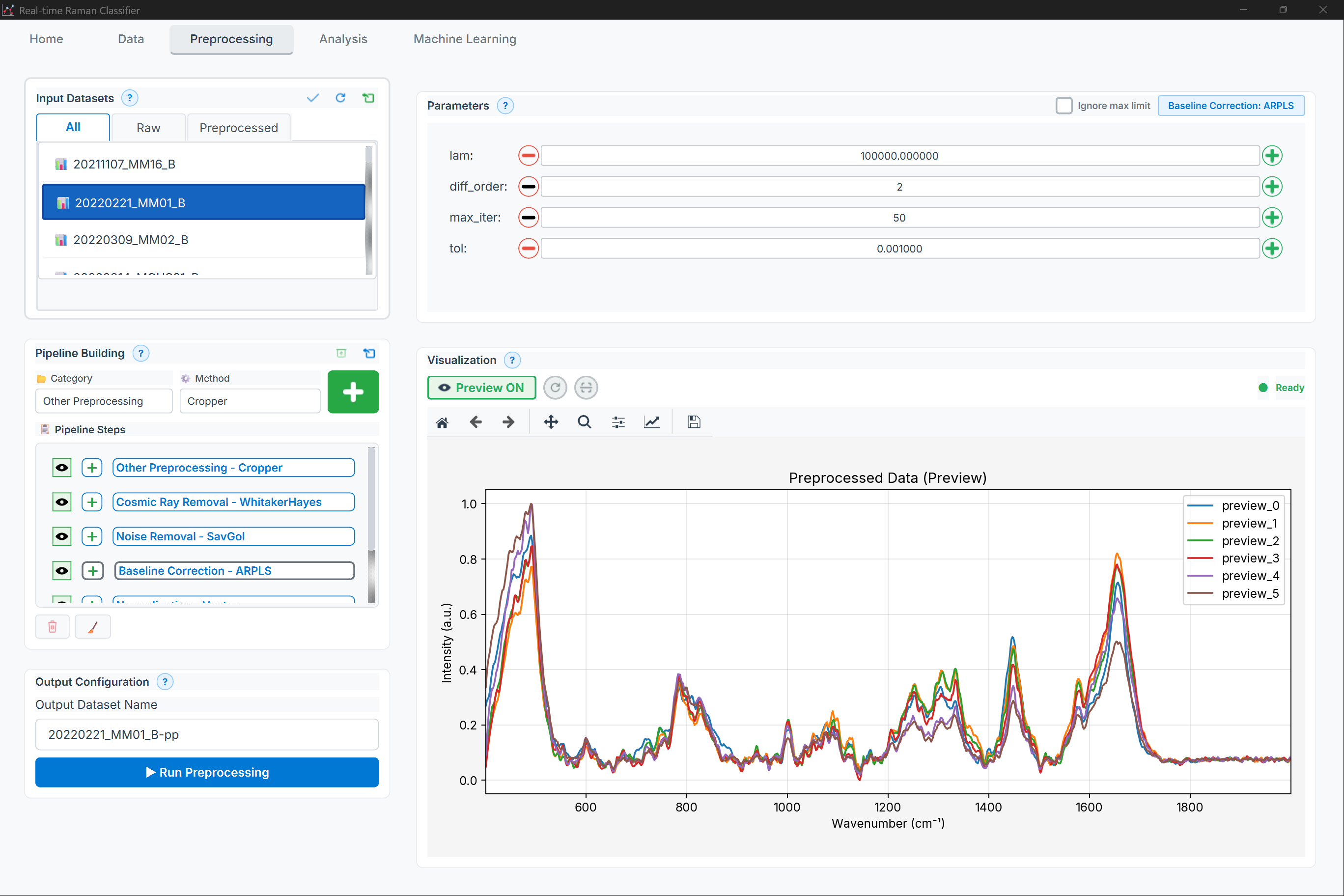
Figure: Preprocessing page showing the pipeline builder and preview plots
High-level layout:
Method selector (tabs)
Pipeline steps + add/reorder/remove
Preview plot + parameters panel
Key Methods:
add_preprocessing_step(method: str, params: dict = None)
Add method to pipeline.
# Add baseline correction
preprocess.add_preprocessing_step(
    'asls',
    {'lambda': 1e5, 'p': 0.01}
)

# Add smoothing
preprocess.add_preprocessing_step(
    'savgol',
    {'window_length': 11, 'polyorder': 3}
)

# Add normalization (no params needed)
preprocess.add_preprocessing_step('vector_norm')
Parameters:
method(str): Method nameparams(dict, optional): Method parameters
Returns: int - Step index
remove_preprocessing_step(index: int)
Remove step from pipeline.
# Remove second step
preprocess.remove_preprocessing_step(1)
Parameters:
index(int): Step index (0-based)
reorder_steps(old_index: int, new_index: int)
Change step order in pipeline.
# Move step 0 to position 2
preprocess.reorder_steps(0, 2)
Parameters:
old_index(int): Current positionnew_index(int): Target position
update_step_params(index: int, params: dict)
Update parameters for specific step.
# Update AsLS parameters
preprocess.update_step_params(0, {
    'lambda': 1e6,
    'p': 0.001
})
Parameters:
index(int): Step indexparams(dict): New parameters
preview_pipeline(spectrum_index: int = 0)
Preview pipeline on single spectrum.
# Preview on first spectrum
preprocess.preview_pipeline(0)

# Preview on selected spectrum
selected_idx = preprocess.get_selected_spectrum()
preprocess.preview_pipeline(selected_idx)
Parameters:
spectrum_index(int): Spectrum to preview
Updates: Preview plot with before/after comparison
apply_pipeline(progress_callback=None)
Apply pipeline to all spectra.
# Simple application
result = preprocess.apply_pipeline()

# With progress tracking
def on_progress(current, total, message):
    print(f"{current}/{total}: {message}")

result = preprocess.apply_pipeline(progress_callback=on_progress)

# Returns preprocessed data dictionary
Parameters:
progress_callback(callable, optional): Progress function(current, total, message)
Returns: dict - Preprocessed data
load_pipeline_template(template_name: str)
Load predefined pipeline.
# Standard pipeline
preprocess.load_pipeline_template('standard')

# Minimal pipeline
preprocess.load_pipeline_template('minimal')

# Derivative-based
preprocess.load_pipeline_template('derivative')
Parameters:
template_name(str): Template identifier
Templates:
'standard': AsLS → SavGol → Vector norm'minimal': AirPLS → Vector norm'aggressive': AsLS → Median → Gaussian → SNV'derivative': AsLS → SavGol 1st derivative → Vector norm'chemometric': MSC → SavGol → Mean center'deep_learning': AsLS → MinMax → Feature scaling
save_pipeline(name: str, description: str = '')
Save current pipeline for reuse.
preprocess.save_pipeline(
    'my_custom_pipeline',
    description='Optimized for tissue samples'
)
Parameters:
name(str): Pipeline namedescription(str, optional): Description
Storage: pipelines/ directory as JSON
load_pipeline(name: str)
Load saved pipeline.
preprocess.load_pipeline('my_custom_pipeline')
Parameters:
name(str): Pipeline name
get_available_methods()
Get list of available preprocessing methods.
methods = preprocess.get_available_methods()

# Returns:
# {
#     'baseline': ['asls', 'airpls', 'polynomial', ...],
#     'smoothing': ['savgol', 'gaussian', 'median', ...],
#     'normalization': ['vector_norm', 'snv', 'msc', ...],
#     'derivatives': ['savgol_1st', 'savgol_2nd'],
#     'advanced': ['cdae', 'wavelet', ...]
# }
Returns: Dict[str, List[str]] - Methods by category
Exploratory Analysis Page
pages/exploratory_analysis_page.py
Exploratory and statistical analysis interface.
AnalysisPage Class
from pages.exploratory_analysis_page import AnalysisPage

analysis = AnalysisPage()
analysis.load_data(preprocessed_data)
Features:
PCA, UMAP, t-SNE visualization
Clustering (hierarchical, K-means, DBSCAN)
Statistical tests (t-test, ANOVA, correlation)
Interactive plots
Results export
UI Structure:

Figure: Analysis page showing method selection, parameters, and results/plots
High-level layout:
Analysis type + method selection (left)
Parameters + apply actions
Results display (plots/tables) (right)
Key Methods:
apply_pca(n_components: int = 2, **kwargs)
Perform PCA analysis.
result = analysis.apply_pca(
    n_components=2,
    whiten=False,
    random_state=42
)

# Returns:
# {
#     'scores': np.array([[...], ...]),
#     'loadings': np.array([[...], ...]),
#     'explained_variance': np.array([...]),
#     'explained_variance_ratio': np.array([...])
# }
Parameters:
n_components(int or float): Number of PCs or variance to retain**kwargs: Additional sklearn.PCA parameters
Returns: dict - PCA results
Updates: Displays scores plot and loadings
apply_umap(n_neighbors: int = 15, min_dist: float = 0.1, **kwargs)
Perform UMAP dimensionality reduction.
result = analysis.apply_umap(
    n_neighbors=15,
    min_dist=0.1,
    n_components=2,
    random_state=42
)

# Returns:
# {
#     'embedding': np.array([[...], ...])
# }
Parameters:
n_neighbors(int): Neighborhood sizemin_dist(float): Minimum distance**kwargs: Additional umap.UMAP parameters
Returns: dict - UMAP results
apply_hierarchical_clustering(linkage: str = 'ward', **kwargs)
Perform hierarchical clustering.
result = analysis.apply_hierarchical_clustering(
    linkage='ward',
    metric='euclidean',
    n_clusters=3
)

# Returns:
# {
#     'clusters': np.array([0, 0, 1, 1, 2, 2, ...]),
#     'linkage_matrix': np.array([[...], ...]),
#     'cophenetic_corr': 0.85
# }
Parameters:
linkage(str): Linkage method (‘ward’, ‘complete’, ‘average’, ‘single’)**kwargs: Additional parameters
Returns: dict - Clustering results
Updates: Displays dendrogram
apply_statistical_test(test_type: str, group1: str, group2: str = None, **kwargs)
Perform statistical test.
# T-test
result = analysis.apply_statistical_test(
    'ttest',
    group1='Control',
    group2='Treatment',
    equal_var=False  # Welch's t-test
)

# ANOVA (multiple groups)
result = analysis.apply_statistical_test(
    'anova',
    group1=None  # Uses all groups
)

# Returns:
# {
#     'statistic': 3.42,
#     'pvalue': 0.001,
#     'significant_features': [100, 234, 567, ...],
#     'effect_sizes': np.array([...])
# }
Parameters:
test_type(str): Test name (‘ttest’, ‘mannwhitney’, ‘anova’, ‘kruskal’)group1(str): First group namegroup2(str, optional): Second group name (for pairwise tests)**kwargs: Test-specific parameters
Returns: dict - Test results
calculate_correlation(method: str = 'pearson')
Calculate correlation matrix.
result = analysis.calculate_correlation(method='pearson')

# Returns:
# {
#     'correlation_matrix': np.array([[1.0, 0.8, ...], ...]),
#     'pvalue_matrix': np.array([[0.0, 0.001, ...], ...])
# }
Parameters:
method(str): Correlation method (‘pearson’, ‘spearman’, ‘kendall’)
Returns: dict - Correlation results
Updates: Displays heatmap
export_results(format: str = 'xlsx')
Export analysis results.
# Export to Excel
analysis.export_results('xlsx')

# Export to CSV
analysis.export_results('csv')

# Export to PDF report
analysis.export_results('pdf')
Parameters:
format(str): Output format (‘xlsx’, ‘csv’, ‘pdf’, ‘html’)
Creates: File in results/ directory
Modeling & Classification Page
pages/machine_learning_page.py
Model training, evaluation, and prediction interface.
MachineLearningPage Class
from pages.modeling_classification_page import MachineLearningPage

ml = MachineLearningPage()
ml.load_data(preprocessed_data)
Features:
Algorithm selection (SVM, RF, XGBoost, LR, MLP)
Hyperparameter tuning
Cross-validation
Model evaluation
Feature importance
Model export/import
UI Structure:

Figure: Machine Learning page showing configuration controls and results dashboards
High-level layout:
Algorithm selection + train/predict controls
Validation and hyperparameter settings
Results dashboard (metrics, plots, exports)
Key Methods:
train_model(algorithm: str, params: dict = None, cv_strategy: str = 'stratified')
Train machine learning model.
# Train Random Forest
result = ml.train_model(
    algorithm='random_forest',
    params={
        'n_estimators': 100,
        'max_depth': None,
        'min_samples_split': 2
    },
    cv_strategy='group'  # Patient-level CV
)

# Returns:
# {
#     'model': trained_model,
#     'train_score': 0.98,
#     'test_score': 0.92,
#     'cv_scores': [0.90, 0.93, 0.91, 0.94, 0.89],
#     'confusion_matrix': np.array([[...], ...]),
#     'classification_report': {...}
# }
Parameters:
algorithm(str): Algorithm nameparams(dict, optional): Hyperparameterscv_strategy(str): CV type (‘stratified’, ‘kfold’, ‘group’)
Returns: dict - Training results
Supported Algorithms:
'svm': Support Vector Machine'random_forest': Random Forest'xgboost': XGBoost'logistic_regression': Logistic Regression'mlp': Multi-Layer Perceptron
optimize_hyperparameters(algorithm: str, param_grid: dict, method: str = 'grid')
Hyperparameter optimization.
# Grid search
result = ml.optimize_hyperparameters(
    algorithm='random_forest',
    param_grid={
        'n_estimators': [50, 100, 200],
        'max_depth': [None, 10, 20],
        'min_samples_split': [2, 5, 10]
    },
    method='grid'
)

# Random search (faster)
result = ml.optimize_hyperparameters(
    algorithm='svm',
    param_grid={
        'C': [0.1, 1, 10, 100],
        'gamma': [0.001, 0.01, 0.1, 1],
        'kernel': ['rbf']
    },
    method='random',
    n_iter=20  # Try 20 random combinations
)

# Returns:
# {
#     'best_params': {'n_estimators': 100, 'max_depth': 20, ...},
#     'best_score': 0.94,
#     'cv_results': {...}
# }
Parameters:
algorithm(str): Algorithm nameparam_grid(dict): Parameter gridmethod(str): Search method (‘grid’, ‘random’, ‘bayesian’)**kwargs: Method-specific parameters
Returns: dict - Optimization results
evaluate_model(model, X_test, y_test)
Evaluate trained model.
metrics = ml.evaluate_model(model, X_test, y_test)

# Returns:
# {
#     'accuracy': 0.92,
#     'precision': 0.91,
#     'recall': 0.93,
#     'f1_score': 0.92,
#     'roc_auc': 0.95,
#     'confusion_matrix': np.array([[...], ...]),
#     'classification_report': {...}
# }
Parameters:
model: Trained modelX_test(np.ndarray): Test featuresy_test(np.ndarray): True labels
Returns: dict - Evaluation metrics
predict(model, X_new)
Make predictions on new data.
# Predict classes
y_pred = ml.predict(model, X_new)

# Predict probabilities
y_proba = ml.predict(model, X_new, return_proba=True)
Parameters:
model: Trained modelX_new(np.ndarray): New datareturn_proba(bool): Return probabilities
Returns: np.ndarray - Predictions or probabilities
get_feature_importance(model, method: str = 'default')
Extract feature importance.
# Default importance (model-specific)
importance = ml.get_feature_importance(model)

# Permutation importance (model-agnostic)
importance = ml.get_feature_importance(
    model,
    method='permutation',
    X=X_test,
    y=y_test
)

# SHAP values (most detailed)
importance = ml.get_feature_importance(
    model,
    method='shap',
    X=X_background  # Background dataset
)

# Returns:
# {
#     'importance': np.array([...]),
#     'feature_indices': np.array([...]),
#     'wavenumbers': np.array([...])
# }
Parameters:
model: Trained modelmethod(str): Importance method**kwargs: Method-specific parameters
Returns: dict - Feature importance
export_model(model, filepath: str)
Save trained model to disk.
ml.export_model(model, 'models/my_model.pkl')

# With metadata
ml.export_model(
    model,
    'models/my_model.pkl',
    metadata={
        'algorithm': 'random_forest',
        'trained_date': '2026-01-24',
        'preprocessing': 'standard_pipeline',
        'accuracy': 0.92
    }
)
Parameters:
model: Trained modelfilepath(str): Output pathmetadata(dict, optional): Model metadata
load_model(filepath: str)
Load saved model from disk.
model, metadata = ml.load_model('models/my_model.pkl')

print(f"Accuracy: {metadata['accuracy']}")
Parameters:
filepath(str): Model file path
Returns: Tuple[model, dict] - Model and metadata
Workspace Page
pages/workspace_page.py
Project management and file browser.
WorkspacePage Class
from pages.workspace_page import WorkspacePage

workspace = WorkspacePage()
Features:
Project file browser
File operations (rename, delete, move)
Project settings
Data summaries
Export options
Key Methods:
set_project_directory(path: str)
Set current project directory.
workspace.set_project_directory('/path/to/project')
Parameters:
path(str): Project directory path
get_project_files()
List all files in project.
files = workspace.get_project_files()

# Returns:
# {
#     'data': ['raw_data.csv', 'preprocessed.csv'],
#     'models': ['model1.pkl', 'model2.pkl'],
#     'results': ['pca_results.xlsx', 'report.pdf'],
#     'pipelines': ['custom_pipeline.json']
# }
Returns: Dict[str, List[str]] - Files by category
export_project(format: str = 'zip')
Export entire project.
# Create ZIP archive
workspace.export_project('zip')

# Create folder structure
workspace.export_project('folder')
Parameters:
format(str): Export format (‘zip’, ‘folder’)
Best Practices
Data Flow Between Pages
# 1. Load data in Data Package page
data_page.import_files(filepaths)
raw_data = data_page.get_data()

# 2. Preprocess
preprocess_page.load_data(raw_data)
preprocessed_data = preprocess_page.apply_pipeline()

# 3. Analyze
analysis_page.load_data(preprocessed_data)
analysis_page.apply_pca(n_components=2)

# 4. Train model
ml_page.load_data(preprocessed_data)
ml_page.train_model('random_forest')
Error Handling in Pages
def on_button_clicked(self):
    try:
        result = self.perform_operation()
        self.show_success_message("Operation completed")
    except DataError as e:
        self.show_error_dialog(f"Data error: {e}")
    except Exception as e:
        logger.exception("Unexpected error")
        self.show_error_dialog(f"An error occurred: {e}")
Progress Reporting
def long_operation(self):
    total_steps = 100

    for i in range(total_steps):
        # Do work
        process_step(i)

        # Update progress
        progress = int((i + 1) / total_steps * 100)
        self.progress_updated.emit(progress, f"Step {i+1}/{total_steps}")
See Also
Core API - Core application modules
Components API - UI components
Functions API - Processing functions
User Guide - User documentation
Last Updated: 2026-01-24